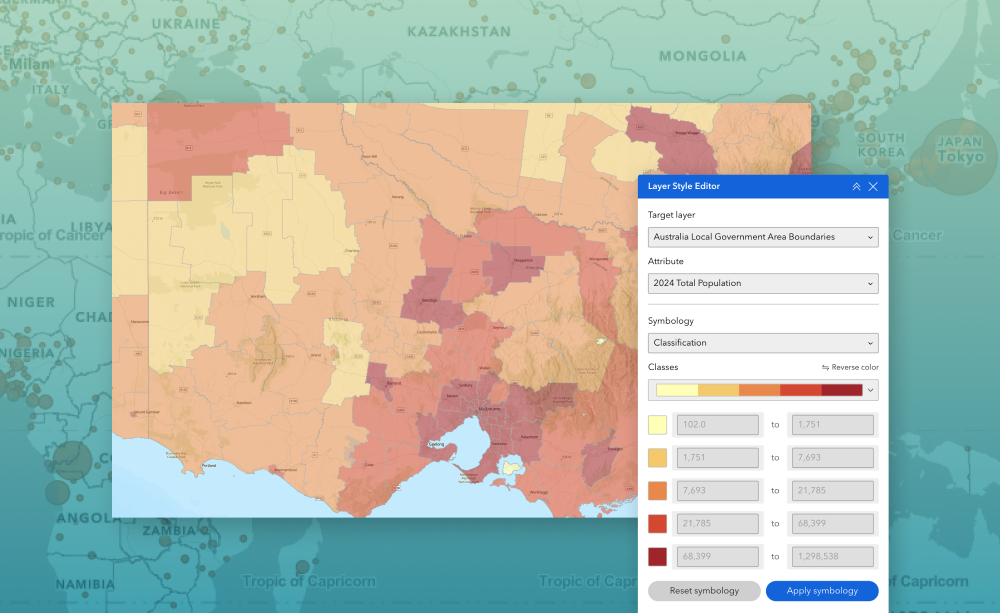
The Layer Style Editor widget lets users apply symbology to polygon layers directly at app runtime. Users simply select a layer and choose an attribute to style. They can then apply either class breaks or unique value symbology and pick an appropriate color ramp to visualize patterns or categories instantly.
Key Features
- Layer & attribute selection—Users choose which polygon layer to style and the attribute field that drives the symbology.
- Class breaks or unique values—Supports numeric class break rendering or unique value styling for categorical attributes.
- Configurable color ramps—Users can apply predefined color ramps to represent ranges or categories clearly.
- Instant map updates—Styling is applied immediately in the live app—no republishing required.
What It Helps You Do
- Quickly visualize patterns in polygon data during runtime without editing the source map.
- Allow end users to create their own thematic maps (e.g., choropleth, category maps).
- Enable flexible, on‑the‑fly data exploration for decision‑making or presentations.
- Reduce reliance on developers or map authors for simple symbology changes.
Example Use Cases
- Highlight zoning polygons by category using unique values.
- Visualize land value or population density using class breaks with a gradient color ramp.
- Allow planners to switch attributes (e.g., land use, assessment value) and restyle the map instantly.
- Support public-facing apps where viewers explore data with their preferred visualization.
Using ArcGIS Online?
If you don’t have access to ArcGIS® Experience Builder Developer Edition, try our Managed Experience Builder for ArcGIS environment. It’s the fastest way to start using custom widgets like this one – no local setup or deployment required.
Learn more