
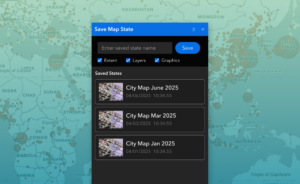
The Save Map State widget lets you save your current map setup – visible layers, graphics, and extent – and bring it back with a single click. It is perfect for switching between tasks, revisiting a previous view, or sharing a consistent setup with others.
When working with maps that contain dozens of layers and overlays, it is easy to lose time reconfiguring your view. The Save Map State widget helps ArcGIS® Experience Builder users preserve and restore specific map configurations with a single click. Whether you are switching between projects, preparing for a meeting, or just want to pick up where you left off, this widget keeps your work focused and efficient.
Save Map State captures everything from layer visibility and map extent to user-drawn graphics and measurements. Each saved state is stored locally for the current user, so there is no need for server-side setup or authentication. You can create multiple states for different workflows and move between them effortlessly.
What it helps you do
Key features
Example use cases
Using ArcGIS Online?
If you don’t have access to ArcGIS® Experience Builder Developer Edition, try our Hosted Experience Builder environment. It’s the fastest way to start using custom widgets like this one – no local setup or deployment required.

