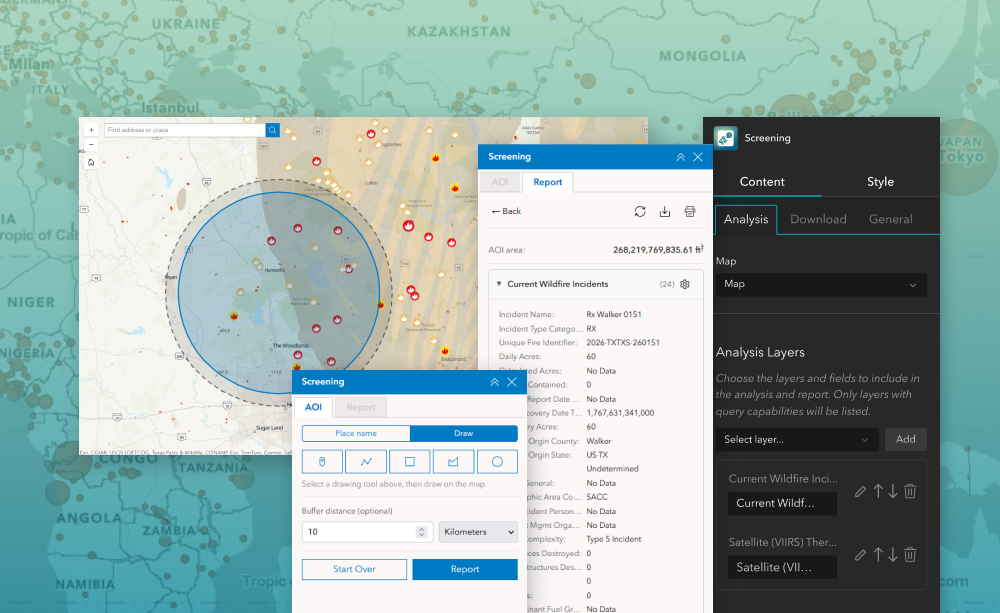
The Screening widget lets users define an area of interest and run spatial analysis on selected layers to assess impacts or intersecting features within that area. Designed for ArcGIS Experience Builder, this widget supports drawing or selecting shapes, applying buffer distances, and reviewing intersecting results in an intuitive panel. Users can quickly identify how features from configured layers relate to an area, explore attribute summaries, and export data for reporting or further analysis.
This widget is ideal for environmental assessment, planning reviews, asset impact checks, and any workflow where you need to understand what lies inside a user-defined area.
What it helps you do
- Define an area of interest using search or drawing tools.
- Analyze intersecting features from one or more configured layers.
- Quickly see summary results and attribute counts.
- Export intersecting results for reporting or review.
Key features
- Area definition tools — select by placename, draw point/line/polygon, or upload geometry for analysis.
- Buffer support — add buffer distances around the area to extend analysis results.
- Layer analysis configuration — choose which layers and fields will be included in the screening results.
- Result display panel — summarized results by layer, attribute, and overlap statistics.
- Export options — output intersecting features for external review or reporting workflows.
Example use cases
- Assess environmental impacts of proposed projects or developments.
- Validate whether assets intersect with protected or regulated zones.
- Support planning and design reviews by summarizing features within a study area.
- Export data for printing, CSV download, or further GIS analysis.
Using ArcGIS Online?
If you don’t have access to ArcGIS® Experience Builder Developer Edition, try our Hosted Experience Builder environment. It is the fastest way to start using custom widgets like this one. No local setup or deployment required.
Learn more