
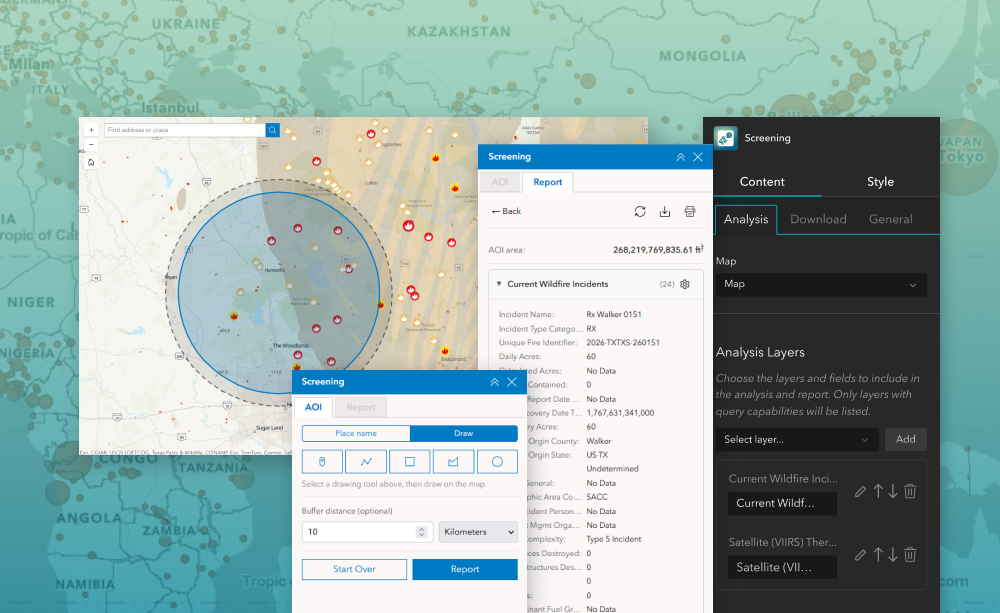
The Screening widget lets users define an area of interest and run spatial analysis on selected layers to assess impacts or intersecting features within that area. Designed for ArcGIS Experience Builder, this widget supports drawing or selecting shapes, applying buffer distances, and reviewing intersecting results in an intuitive panel. Users can quickly identify how features from configured layers relate to an area, explore attribute summaries, and export data for reporting or further analysis.
This widget is ideal for environmental assessment, planning reviews, asset impact checks, and any workflow where you need to understand what lies inside a user-defined area.
What it helps you do
Key features
Example use cases
Using ArcGIS Online?
If you don’t have access to ArcGIS® Experience Builder Developer Edition, try our Managed Experience Builder for ArcGIS environment. It is the fastest way to start using custom widgets like this one. No local setup or deployment required.

