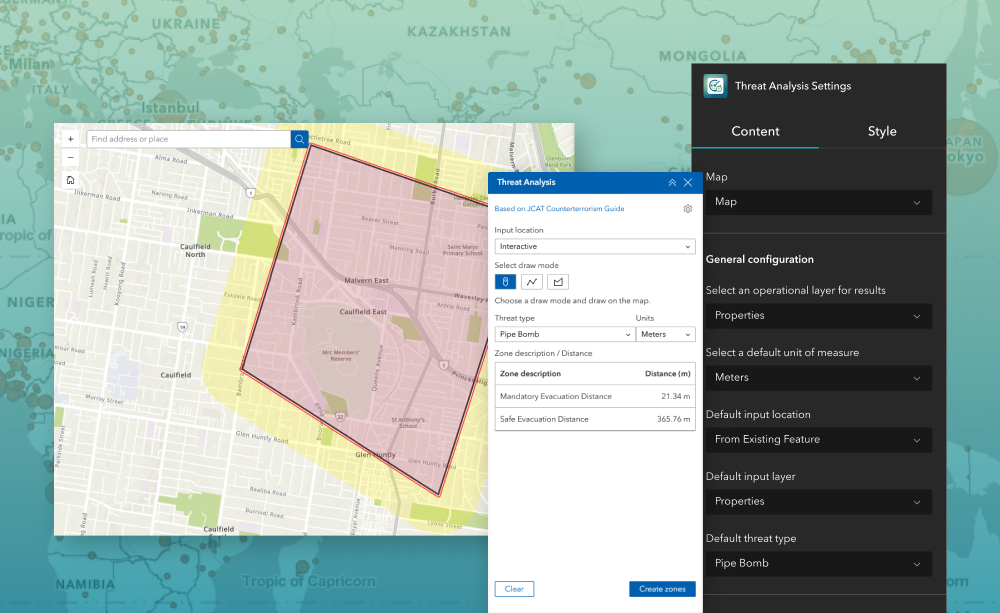
The Threat Analysis widget helps public safety teams and event planners quickly determine mandatory and safe evacuation distances for potential incidents (for example, chemical releases or LPG explosions). Designed for ArcGIS® Experience Builder, this widget supports configuration of default threat types, units, and inputs so your users can create standardized, repeatable zones—and optionally save results to an editable layer.
What it helps you do
- Faster incident planning: Generate mandatory and safe evacuation zones around a location with a few clicks—use interactive selection, fixed coordinates, or existing features.
- Consistent standards: Centralize threat type definitions (distances, symbology, and naming) to ensure everyone uses the same guidance.
- Operational outputs: Write results to an editable polygon layer for downstream analysis, sharing, and reporting.
Key features
- Threat Type management—Define, edit, reorder, or remove threat types. For custom threats, add one or many threat zones with a description, distance, and symbol.
- Flexible inputs—Pick the default input location users will see: Interactive, Fixed Coordinate, or From Existing Features (paired with a default input layer).
- Result destination—Select an operational (editable polygon) layer from the current web map to store output zones (only eligible, editable, in‑org layers are listed).
- Symbology control—Configure outline/fill colors, styles, and transparency for categories such as Chemical or LPG threats (Enterprise variations may show dedicated Symbology tabs). Common use cases
Example use cases
- Special event security: Pre‑define standoff perimeters for stages, dignitary areas, or high‑risk assets to support crowd and route planning.
- Hazmat preparedness: Model mandatory and safe evacuation distances for chemical or LPG incidents; store scenarios for tabletop exercises.
- Utilities & pipelines: Create buffer‑based zones around facilities or linear assets to guide maintenance isolation and emergency response plans
Using ArcGIS Online?
If you don’t have access to ArcGIS® Experience Builder Developer Edition, try our Hosted Experience Builder environment. It is the fastest way to start using custom widgets like this one. No local setup or deployment required.
Learn more